Retrieval-Augmented Generation (RAG) is the “search + chat” pattern that helps AI answer questions using your documents instead of guessing. This beginner’s guide explains how RAG works step by step—documents, chunking, embeddings, vector search, prompt augmentation, and generation—plus common mistakes and practical tips for building trustworthy AI assistants.
Introduction: What this guide covers and who it’s for
If you’ve ever asked a chatbot a confident-sounding question and gotten a confident-sounding wrong answer, you’ve run into one of the biggest issues in modern AI: the model can “hallucinate” (make up information that sounds plausible).
This beginner-friendly guide explains Retrieval-Augmented Generation (RAG), a practical pattern that solves this problem by combining two ideas:
Search (retrieve relevant passages from your documents)
Chat (generate a natural-language answer using those passages)
Think of RAG as giving your chatbot an open-book exam instead of a closed-book one. The AI doesn’t have to rely only on what it “remembers” from training—it can look up the answer in your knowledge base and respond grounded in real text.
This is for you if you’re a beginner who wants to understand how modern “AI over documents” works—whether you’re building a support bot, an internal company assistant, or a research helper.
What You’ll Learn
What RAG is (in plain language) and why it’s so widely used
How “Search + Chat” reduces hallucinations and improves accuracy
The key building blocks: knowledge base, embeddings, vector search, retriever, and generator
A step-by-step walkthrough of the RAG pipeline—from documents to answers
Common mistakes beginners make (and how to avoid them)
Practical examples of RAG in real products and workplaces
Prerequisites
No advanced background required. Helpful (but not necessary):
Basic understanding that an LLM (large language model) predicts text
Familiarity with the idea of a search engine (keywords, results)
If terms like “embeddings” or “vector database” sound scary—don’t worry. We’ll explain them with simple analogies.
Most chatbots are powered by LLMs. An LLM is trained on a large pile of text and learns patterns—how words and ideas tend to follow each other. That’s great for writing and conversation.
But here’s the catch: an LLM is not a database. It doesn’t store facts in a neat table. So when you ask:
“What’s our company’s refund policy for annual plans?”
“Which of our products supports SOC 2?”
“What changed in the latest internal procedure?”
If the model wasn’t trained on your latest internal docs—or if it’s unsure—it may still produce an answer that sounds right. That’s hallucination: fluent text without guaranteed grounding.
Note: Hallucinations aren’t “bugs” in the usual sense. They’re a natural consequence of how language models generate text: predicting what looks like a good continuation.
What RAG is (the one-sentence explanation)
Retrieval-Augmented Generation (RAG) is a method where the system retrieves relevant information from external documents and then augments the AI’s prompt with that information so the model can answer using actual sources.
In other words: RAG = Search + Chat.
The “open-book exam” analogy
Imagine two students:
Student A (no RAG): answers from memory. Sometimes right, sometimes confidently wrong.
Student B (with RAG): quickly flips to the right pages in the textbook and answers based on what’s written.
RAG turns your chatbot into Student B.
The main parts of a RAG system (in human terms)
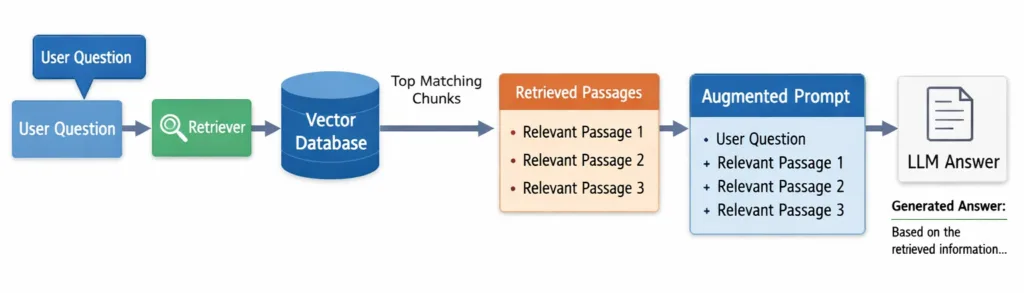
A typical RAG setup has four core components:
Knowledge Base: where your documents live (PDFs, web pages, manuals, internal wikis, tickets, policies).
Retriever: the “search brain” that finds the most relevant passages.
Integration Layer: the “assembler” that combines the user’s question + retrieved passages into a clean prompt.
Generator (LLM): the “writer” that produces the final answer in natural language.
Embeddings and vector search (explained without the math)
To retrieve relevant text, many RAG systems use semantic search (meaning-based search), not just keyword matching.
That’s where embeddings come in. An embedding is a way to turn text into a list of numbers that represents its meaning. Similar meanings end up “near” each other in this number space.
Real-world analogy: Think of embeddings like GPS coordinates for ideas. Two sentences about “canceling a subscription” might be far apart in wording, but close together in meaning—so they’ll be close on the “idea map.”
Tip: Keyword search is like looking for the exact book title. Semantic search is like asking a librarian what books are about a topic—even if you don’t know the exact words.
Context window: the “backpack size” limit
LLMs can only read a limited amount of text at once. This limit is called the context window. You can think of it like a backpack: the model can only carry so many pages into the exam room.
RAG must choose which passages to include. If you stuff in too much irrelevant text, you waste space and the answer quality can drop.
Diagram
A simple left-to-right RAG pipeline showing how a user question is matched against a vector database, relevant text chunks are retrieved, and an augmented prompt is sent to the LLM to generate a grounded answer.
Step-by-Step Walkthrough: How RAG works end-to-end
Let’s walk through RAG like you’re building or evaluating a system. Even if you’re not coding, this workflow will help you understand what’s happening under the hood.
Step 1) Collect your documents (your “source of truth”)
Start with the information you want the AI to use:
Help center articles
Product documentation
Employee handbook
Policies and procedures
Contracts and FAQs
The key idea: RAG is only as trustworthy as the documents you feed it.
Step 2) Clean and standardize the content
Before indexing, teams often do basic cleanup:
Remove navigation clutter from web pages
Fix OCR errors in scanned PDFs
Normalize headings and formatting
Ensure each doc has metadata (title, URL, date, department)
Note: Metadata matters. Knowing a chunk came from “Refund Policy (Updated Jan 2026)” is incredibly useful for ranking results and for showing citations.
Step 3) Chunk the documents into small pieces
LLMs and retrievers work better with smaller passages (“chunks”) than whole documents.
Why chunking helps:
Search becomes more precise (you retrieve the relevant paragraph, not 20 pages)
You fit more targeted information into the context window
You reduce the chance the model gets distracted by irrelevant sections
Example: Instead of storing an entire “Terms of Service” page as one block, you split it into sections like “Billing,” “Refunds,” “Cancellation,” and “Liability.”
Step 4) Create embeddings and store them in a vector database
For each chunk:
Generate an embedding (meaning-vector)
Store the embedding + the chunk text + metadata in a vector database
A vector database is optimized to quickly find “nearest neighbors” (the most similar chunks) when you search by meaning.
Step 5) User asks a question
Now the “live” part begins. A user asks something like:
“Can I get a refund if I paid annually and I’m 20 days into the plan?”
Step 6) The retriever finds the most relevant chunks
The system:
Creates an embedding for the user’s question
Searches the vector database for the most similar chunk embeddings
Returns the top matches (often top 3–10 chunks)
What good retrieval looks like: the returned chunks contain the exact policy section about annual plan refunds and time limits.
Next, the integration layer builds a prompt that might look like this (simplified):
You are a support assistant. Answer using ONLY the provided policy excerpts.
If the answer is not in the excerpts, say you don’t know and ask a follow-up.

User question:
Can I get a refund if I paid annually and I’m 20 days into the plan?

Policy excerpts:
1) Refunds for annual plans are available within 14 days of purchase...
2) After 14 days, annual plans are non-refundable, but you may cancel renewal...
This is the “grounding” step—where the system hands the model the relevant pages of the “open book.”
Step 8) Generation: the LLM writes an answer grounded in the excerpts
The LLM uses the excerpts to respond in a helpful way, for example:
It states the 14-day refund limit
It explains the alternative (cancel renewal)
It may ask clarifying questions (purchase date, plan type)
Many RAG systems also display the excerpts as clickable citations so users can verify.
Step 9) (Optional) Keep the knowledge base fresh without retraining
One of the biggest wins of RAG is maintenance: when policies change, you update the docs and re-index them—no expensive model retraining required.
Tip: Treat your knowledge base like a product. Assign owners, update schedules, and a simple “last reviewed” date so the AI isn’t grounded in outdated info.
Practical Examples: Where RAG shows up in real life
Example 1: Customer support bot that answers from your help center
Problem: Customers ask detailed questions, and agents spend time searching articles.
RAG solution: Index help center articles, retrieve relevant sections, and generate a friendly answer that matches official docs.
RAG reduces hallucinations, but it doesn’t magically prevent them. The model can still:
Misread a passage
Overgeneralize
Combine chunks incorrectly
Fix: Use clear instructions like “Answer only from sources,” request citations, and add checks (for example, refuse to answer if retrieval confidence is low).
Mistake 2: Poor chunking (too big or too small)
Too big: Retrieval returns a giant chunk that includes noise.
Too small: Retrieval returns fragments that miss critical context.
Fix: Chunk by meaning (sections/headings), and consider slight overlap so definitions and conditions stay together.
Mistake 3: Indexing messy documents and expecting clean answers
If your docs are outdated, contradictory, or poorly formatted, the assistant will reflect that.
Fix: Clean sources, remove duplicates, and add document ownership and versioning.
Mistake 4: Retrieving irrelevant results because the query is vague
Users often ask short questions like “Does this support exports?” Export what? From where?
Fix: Let the assistant ask a clarifying question when the query is ambiguous instead of guessing.
Mistake 5: Stuffing too many chunks into the prompt
More context is not always better. Too much text can crowd out the user’s question and confuse the model.
Fix: Retrieve fewer, higher-quality chunks; re-rank results; summarize long passages before injecting (carefully, with guardrails).
Mistake 6: Forgetting the “last mile”: showing sources to users
RAG is much more trustworthy when users can see where an answer came from.
Fix: Display citations/snippets, document titles, and links whenever possible.
Next Steps: How to go from understanding to building
If you want to keep learning (or start implementing), here’s a beginner-friendly path.
1) Start small with one well-defined use case
Pick one domain: refunds, onboarding, IT troubleshooting, or product docs
Use a small, clean set of documents
Define what “correct” means (and what the bot should refuse to answer)
2) Learn the basic tuning knobs
Chunk size and overlap
Top-k retrieval count (how many chunks you fetch)
Prompt instructions (answer only from context, cite sources, ask follow-ups)
Metadata filters (only retrieve from “HR” docs, or only “latest version”)
3) Add evaluation early
Create a small test set of real questions and expected answers. Track:
Did retrieval find the right passage?
Did the model use it correctly?
Did it cite the right source?
Note: Many “RAG failures” are actually retrieval failures, not generation failures. Always check what passages were retrieved first.
4) Consider advanced upgrades (when you’re ready)
Re-ranking: a second model re-orders retrieved chunks for better relevance
Query rewriting: rewrite user queries to improve retrieval (“exports” → “CSV export feature limits”)
Access control: ensure users only retrieve documents they’re allowed to see
Freshness: automatically re-index updated docs on a schedule
Conclusion: RAG is how you make chatbots useful (and trustworthy) at work
Retrieval-Augmented Generation (RAG) is one of the most practical patterns in real-world AI because it tackles a core weakness of LLMs: they can sound right even when they’re wrong.
By combining retrieval (search) with generation (chat), RAG helps AI answers stay grounded in your documents—so the assistant can respond with the same information your team would find by searching manuals, policies, and knowledge bases.
If you’re new to AI, RAG is a great place to start because it’s intuitive: give the model the right pages, and it gives you a better answer. Start small, keep your documents clean, test retrieval carefully, and build from there.