

Introduction: Turning “I can run a model” into “I can ship work”
Running an LLM on your laptop is fun the first time you see it work. The real value shows up later—when that model becomes part of your daily workflow: answering questions inside an IDE, drafting and refactoring code with an agent, powering a support bot, or automating routine tasks in a pipeline.
That’s where Ollama’s integrations ecosystem matters. Ollama isn’t only a way to download and run models locally; it increasingly behaves like a practical model runtime that plugs into existing tools. The key enabler is its OpenAI-compatible API surface, which lets many apps “think” they’re talking to an OpenAI-style endpoint—while you’re actually using local models or (in supported setups) switching to cloud-hosted models without rewriting your application logic.
This article explains how Ollama integrations work in practice—especially the OpenAI-compatible pattern—and how that connects to coding-agent tools (including Claude Code-style workflows) and assistant wrappers like OpenClaw. We’ll also clarify what “free tier” constraints usually mean in cloud contexts, and how local inference differs operationally.
Definition: What are “Ollama integrations”?
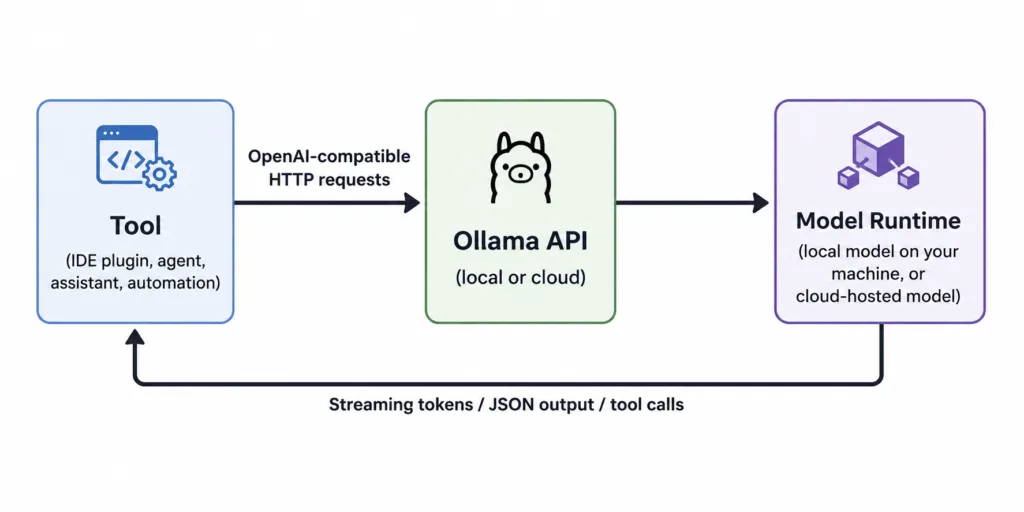
Ollama integrations are ways to connect Ollama—running on your machine or as a reachable service—to other tools (coding agents, editors, assistants, automation platforms, notebooks, and apps) so those tools can send prompts, receive responses, stream tokens, call tools/functions, and process structured outputs.
The simplest mental model is:
- Ollama is the engine (it runs the model and produces outputs).
- Integrations are the “vehicles” (IDEs, agents, chat apps, automations) that drive that engine.
- The OpenAI-compatible API is the “standard connector” that lets many vehicles attach without custom wiring.
How It Works: The OpenAI-compatible API pattern (local and cloud)
Most modern AI developer tools were built around a few common API patterns—especially OpenAI-style chat/completions APIs. Ollama supports an OpenAI-compatible interface for key endpoints and capabilities (for example, chat completions with streaming, structured outputs/JSON mode, tool calling, and more, depending on model support and server version).
Practically, this means you can often take existing code that uses an OpenAI SDK, and change just two things:
- The base URL (point it to Ollama instead of a hosted provider)
- The model name (use an Ollama model identifier)
An analogy: swapping a power source without rebuilding the appliance
Imagine your application is a kitchen appliance designed for a standard wall outlet. The OpenAI-compatible API is that outlet standard. Ollama is like a local generator that provides power through the same socket shape. You don’t rebuild the blender; you just plug it into a different source.
That’s why integrations matter: they reduce “model adoption” from a rewrite into a configuration change.
Local setup: a single-machine AI backend
In local mode, Ollama runs a server (commonly on http://localhost:11434). Tools connect to it over HTTP. When a client sends a request (like a chat completion), Ollama:
- Receives the prompt/messages.
- Runs inference using the selected model (CPU/GPU depending on your hardware).
- Streams tokens back (if streaming is enabled) or returns a full response.
- Optionally follows tool-calling instructions if your integration supports it.
Cloud setup: same interface, different constraints
With cloud-hosted models, the workflow can look identical from the client’s perspective: send requests to an OpenAI-compatible endpoint, receive responses the same way. The difference is operational:
- Latency may increase due to network round trips.
- Availability can improve if the provider scales.
- Quota and concurrency limits are common, especially on free tiers.
- Privacy and data handling depend on provider policies and configuration.
A useful practice is to develop locally (fast iteration, low cost, privacy-friendly), then switch to cloud for larger models or higher throughput—without redesigning your application.
Key Components: What you actually configure in real projects
Most Ollama integration work comes down to a few repeatable components.
1) The endpoint (base URL)
Tools need a base URL. Locally it’s typically something like:
http://localhost:11434/v1for OpenAI-style routes
In cloud scenarios, it becomes a hosted URL. The point is: your app talks HTTP to a predictable contract.
2) The model identifier
Integrations require a model name. In an OpenAI-shaped client, this appears in the model field. In Ollama, model identifiers depend on what you’ve pulled and how it’s tagged.
Tip: In team settings, standardize model names (and versions) the same way you standardize dependency versions. “It works on my machine” is often a model mismatch, not a code bug.
3) Capabilities: streaming, JSON mode, tool calling, vision
Modern workflows often need more than plain text:
- Streaming for responsive UX (tokens appear as they’re generated)
- Structured outputs (JSON mode) for automation and reliable parsing
- Tool calling so the model can request actions (run tests, read files, query APIs)
- Vision for image-aware tasks (where supported)
A key misconception is that these are “model features only.” In practice, they’re a combination of:
- the model’s ability to follow instructions,
- the server/runtime support,
- and the client/integration’s ability to execute the tool calls and return results.
4) Reproducibility controls (seeds, temperature, etc.)
When you move from chat demos to production workflows, reproducibility matters. Many integrations expose controls like temperature and seed-like behavior (where supported). Think of it like unit testing: you want fewer “surprises” when a workflow is rerun.
5) Authentication expectations
Some OpenAI SDKs require an API key string to exist even if your local server doesn’t validate it. In local Ollama development, it’s common to set a placeholder value. In cloud mode, keys and quotas are real constraints.
Real-World Applications: Where integrations pay off
Ollama’s integration story becomes concrete in day-to-day work. Below are common patterns and how local vs cloud affects them.
Application 1: “Drop-in” backend for existing OpenAI SDK code
If you already have internal scripts or apps using an OpenAI client library, Ollama can often be used by switching the base URL.
Example (Python-style):
from openai import OpenAI

client = OpenAI(
    base_url="http://localhost:11434/v1",
    api_key="ollama"  # placeholder for local usage
)

resp = client.chat.completions.create(
    model="llama3",
    messages=[
        {"role": "system", "content": "You are a concise technical assistant."},
        {"role": "user", "content": "Explain what a mutex is with an analogy."}
    ],
    temperature=0.2
)

print(resp.choices[0].message.content)
Where it shines: rapid local prototyping, privacy-sensitive content, development without external API cost.
Application 2: Coding agents in a repo (read/modify/run loop)
Coding agents are where integrations become “workflow infrastructure.” An agent typically needs to:
- Read files
- Write patches
- Run commands (tests, linters, builds)
- Iterate until completion
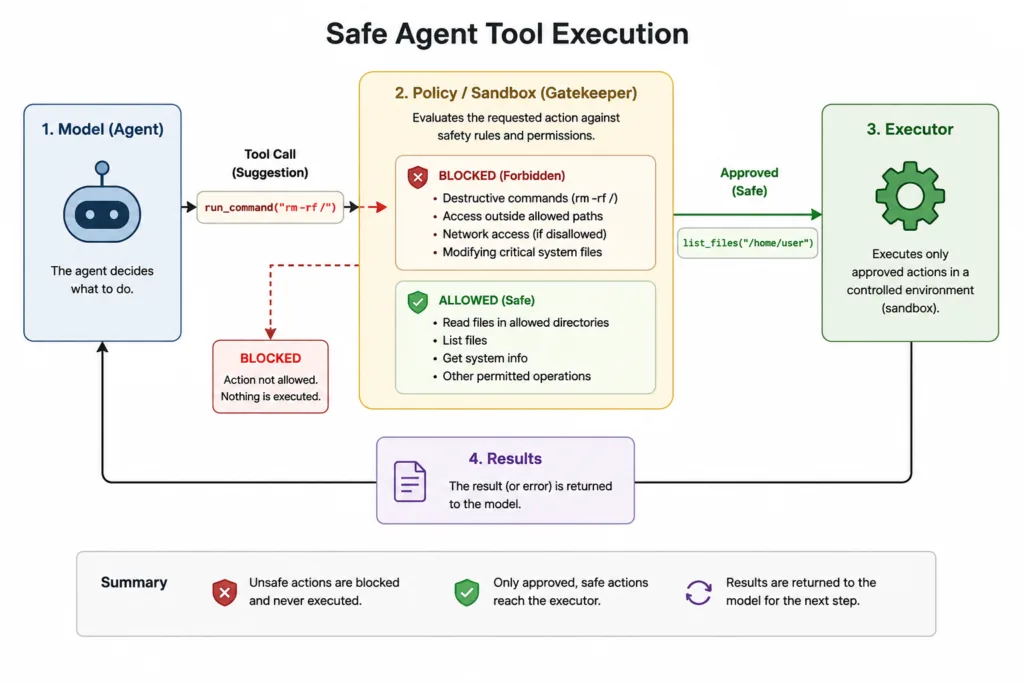
In this loop, the model is only one part. The integration must safely grant tools and interpret results. Ollama’s OpenAI-compatible API makes it easier for agent frameworks that already expect that contract to plug into a local model.
Concrete use case: “Update the API client, regenerate types, run tests, and open a PR description.” With tool calling, the model can request actions like run_tests, read_file, or search_repo—and your agent runner executes those actions, returning outputs to the model.
Application 3: Claude Code-style workflows (what to know)
“Claude Code” is often used as shorthand for a class of coding-assistant tools that operate across your codebase (not just a single prompt), combining:
- repository context gathering,
- multi-step reasoning,
- tool execution,
- and iterative refinement.
In practice, whether a specific coding tool can use Ollama depends on whether it supports:
- a configurable provider,
- an OpenAI-compatible endpoint, or
- a plugin/adapter system.
Practical takeaway: the more a coding tool is “OpenAI-API-shaped,” the more likely Ollama can serve as a backend—at least for development, offline work, or privacy-focused tasks. For cloud-only tools tied to a specific vendor API, you may need a bridging layer or you may be limited to the tool’s supported providers.
Application 4: OpenClaw and assistant wrappers (provider abstraction)
Assistant wrappers like OpenClaw typically add:
- prompt templates and roles,
- conversation state management,
- tool routing and orchestration,
- provider switching (local vs cloud) behind one config.
Here, Ollama acts as an interchangeable “engine.” OpenClaw (or similar tools) is the “dashboard” that makes that engine usable for a particular assistant experience.
Concrete use case: A personal assistant that summarizes notes locally, but switches to a cloud model for longer documents or higher-quality reasoning—without changing the UI or the automation logic.
Application 5: IDE integrations (VS Code/JetBrains-style assistants)
IDE assistants typically need fast completions, code explanation, refactors, and quick Q&A. Local models can be attractive because:
- you avoid sending proprietary code to third parties,
- cost is predictable,
- offline work is possible.
Cloud models can complement this when:
- you need a larger context window,
- you need higher reliability under load,
- your laptop can’t run the desired model efficiently.
Application 6: Automation platforms (n8n-style workflows)
Automations need structured, parseable outputs. This is where JSON mode and strict schemas matter.
Example workflow:
- Trigger: new support ticket arrives.
- Step: LLM categorizes issue and extracts entities into JSON.
- Step: route to the correct team, draft a response, and create follow-up tasks.
Local models can handle sensitive content, while cloud can help with peak throughput or more complex categorization.
Benefits: Why this ecosystem approach is valuable
1) Low-friction switching between local and cloud
OpenAI compatibility means your integration layer doesn’t have to care where inference happens. You can standardize your app around one API shape and treat “local vs cloud” as an environment decision.
2) Cost and privacy control
Local inference is attractive when you want:
- no per-token billing,
- data staying on-device,
- repeatable dev environments.
Cloud complements this when you need to scale beyond a single machine’s hardware limits.
3) Faster iteration for builders
Developers can iterate locally, with shorter feedback loops and fewer external dependencies. When a project matures, moving to hosted inference can be a deployment optimization rather than a rewrite.
4) A path from “assistant toy” to “workflow tool”
Integrations turn LLMs into something operational: agents that run tasks, IDE helpers that understand your repo, automations that output strict JSON, and assistants embedded in products.
Challenges and Limitations: What can bite you in production
1) “OpenAI-compatible” is not “OpenAI identical”
Compatibility typically covers common endpoints and behaviors, but not every edge case. Differences may appear in:
- tool calling schemas and behavior,
- token accounting and logprob formats,
- multimodal request shapes,
- streaming event formats,
- responses vs chat-completions nuances depending on client library.
Practical mitigation: Write a thin “LLM provider adapter” in your app and test against both local and cloud backends early.
2) Local performance and concurrency are hardware-bound
Local inference has no vendor quota, but it has physics:
- CPU-only inference can be slow for large models.
- GPU memory limits constrain which models you can run.
- Concurrency is limited by your machine’s ability to serve multiple requests at once.
Rule of thumb: If you want many simultaneous agent runs, you’ll likely need either strong hardware, careful request scheduling, or a cloud backend.
3) Cloud “free tier” limits (what they usually mean)
Readers often assume “free tier” means “use it like production until I’m ready to pay.” In practice, free tiers commonly impose limits such as:
- Concurrency caps (only N simultaneous requests)
- Rate limits (requests per minute/day)
- Token or compute quotas (monthly included usage)
- Model availability restrictions (smaller set of models)
Important nuance: local Ollama usage is typically not governed by these vendor-style concurrency caps—your limiting factor is your own compute. Cloud usage, however, is usually subject to plan-based quotas. If you’re planning an integration around a free tier, verify the current limits in the provider’s pricing/docs and design fallbacks (queueing, retries, degradation to a smaller model, etc.).
4) Tool calling introduces security and safety requirements
Once an agent can run commands or edit files, you need guardrails:
- permission boundaries (which commands are allowed),
- sandboxing for execution,
- audit logs,
- human-in-the-loop approval for risky actions.
Many teams underestimate this step. “It can write code” is easy; “it can safely run code” is the real engineering work.
Future Outlook: Where Ollama integrations are heading
Several trends are pushing Ollama-style runtimes into mainstream workflows:
- Standardized APIs as the norm: tools increasingly treat “provider” as a configuration, not a rewrite.
- Agentic development: more engineering work will be done by systems that can plan, call tools, and iterate—not just chat.
- Hybrid inference: local models for privacy and low cost; cloud models for scale and heavy reasoning—within one application.
- Structured outputs everywhere: LLMs are becoming components in pipelines, so JSON/schema compliance will be a first-class requirement.
If this direction continues, the most valuable skill won’t be “running a model,” but designing workflows that can switch models, validate outputs, and execute tools safely.
Conclusion: Key takeaways
- Ollama integrations are about workflows, not novelty. The big win is plugging models into tools you already use: agents, IDEs, assistants, automations, and notebooks.
- The OpenAI-compatible API is the integration backbone. It often lets you swap a local Ollama backend into existing OpenAI-style clients with minimal changes.
- Local vs cloud is a deployment choice. Local offers privacy and predictable cost; cloud offers scale and access to larger models—often through the same API shape.
- Expect limits in free cloud tiers. Concurrency and quota caps are common; design your system to queue, retry, or degrade gracefully.
- Tool calling enables powerful agents—but demands guardrails. Sandboxing, permissions, and auditing turn a clever demo into a safe daily driver.
When you treat Ollama as a runtime that fits into a broader ecosystem—rather than a standalone chat box—you unlock the practical promise of LLMs: reliable, repeatable work embedded into your day-to-day engineering and business processes.