


Introduction: What this guide explains (and why it matters)
Google AI Studio has become the quickest way to experiment with Google’s Gemini models in a browser, generate an API key, and move from a prompt idea to working code with minimal setup. In 2026, that “fast path” is even more valuable because Gemini capabilities evolve quickly—new model variants appear, preview models change, and older models can be deprecated. If you prototype the right way (and understand where AI Studio ends and Vertex AI begins), you can avoid unpleasant surprises when you scale to production.
This article explains how Google AI Studio works with the Gemini Developer API, how to use structured outputs (especially JSON Schema) to make responses reliably machine-readable, and how to decide between AI Studio and Vertex AI depending on your stage and requirements.
Definition: What is Google AI Studio?
Google AI Studio is a browser-based workspace for prototyping with Gemini through the Gemini Developer API. Think of it as a “sandbox + control panel” where you can:
- Try prompts and multimodal inputs (text, images, documents, and, depending on model/tooling, audio/video workflows)
- Compare outputs across model families (for example, faster “Flash” models vs more capable “Pro” models, plus preview variants)
- Generate an API key tied to a Google Cloud project so you can call Gemini from your application
- Test structured outputs (like JSON) before you write production code
Analogy: If Gemini is an advanced engine, AI Studio is the test bench in the garage—turn knobs, swap parts, measure results. Vertex AI is the factory floor—governed, scalable, and designed for repeatable production operations.
How It Works: From prompt to API call
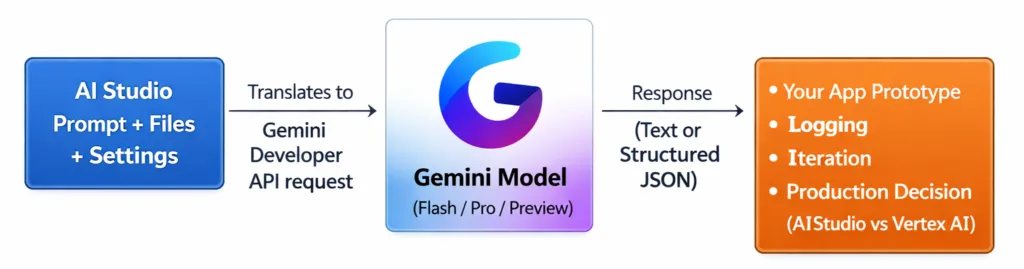
Under the hood, AI Studio is a user-friendly interface that helps you build and test requests that ultimately translate into Gemini Developer API calls. Your workflow usually looks like this:
- Choose a model (for example, a Flash model for speed or a Pro model for deeper reasoning).
- Provide inputs: plain text, files (images/PDFs), or multimodal prompts depending on the model’s capabilities.
- Set generation controls such as temperature (creativity), max output tokens (length), or safety settings.
- Optionally constrain the output using structured outputs so the model returns valid JSON that matches your schema.
- Run iterations quickly: adjust prompt wording, test edge cases, validate JSON structure.
- Generate an API key and copy a code snippet into your app (web, mobile, backend) to reproduce the same request programmatically.
The prototyping pipeline
Key Components
1) Model selection: Flash vs Pro (and preview models)
In 2026, you’ll commonly see Gemini models offered in tiers and variants:
- Flash: optimized for low latency and cost; great for chat UX, summarization, extraction, and high-throughput endpoints.
- Pro: optimized for stronger reasoning and harder tasks (complex planning, code understanding, long-context analysis).
- Preview models: early access to new capabilities; useful for experimentation but riskier for long-lived production dependencies.
Practical rule: Prototype with the model you expect to ship, but keep a fallback option. If you start with a preview model, test a stable alternative early so you have a migration path.
2) Prompt workspace: fast iteration and evaluation
AI Studio is designed for rapid prompt iteration: tweak instructions, run again, compare results. Treat this like writing tests for a function: you’re trying to find prompts that behave reliably across typical inputs and edge cases.
Common misconception: “A prompt that works once is good enough.” In practice, prompts need to be evaluated against a set of representative examples (different tones, lengths, messy documents, ambiguous user questions) before you trust them.
3) Multimodal inputs: text + images + documents (and beyond)
Gemini’s multimodal ability means you can upload or reference non-text inputs and ask questions about them. AI Studio makes this easy by letting you attach files directly to prompts.
Concrete examples:
- Upload a screenshot of an error and ask for a diagnosis and fix steps.
- Upload a PDF contract and extract key clauses into a structured checklist.
- Upload product photos and generate alt text, titles, and category tags.
Analogy: Multimodal models are like a teammate who can read both the written brief and the diagrams on the whiteboard—less “telephone game” loss between what you see and what you can describe in text.
4) API key generation: the bridge from prototype to app
AI Studio’s “Get/Create API key” flow is a major reason it’s the fastest entry point. You can connect the key to a new or existing Google Cloud project and start calling the Gemini Developer API from your app.
Security note: Treat API keys like passwords. Don’t embed them in client-side code or public repositories. Use server-side proxies, secret managers, or platform-specific secure storage.
5) Structured outputs with JSON Schema: making AI predictable for software
One of the most practical 2026-era features is structured outputs: you constrain the model to return JSON that matches a schema. This matters because software needs predictable structures—fields, types, allowed values—not paragraphs that vary each run.
Analogy: Free-form text is like asking someone to “write the shipping label however you want.” JSON Schema is like using a pre-printed label template with fixed boxes for name, address, and postal code.
Why structured outputs change prototyping
- Reliability: your parser stops breaking because the model added extra commentary.
- Safer automation: structured data can flow into workflows (databases, CRMs, ticketing systems).
- Better evaluation: you can automatically validate output using JSON Schema validators.
Example: Extracting support-ticket fields from a messy email
Goal: Turn an inbound email into a machine-readable object your helpdesk system can ingest.
Desired JSON shape (conceptual schema):
{
  "type": "object",
  "properties": {
    "request_type": {"type": "string", "enum": ["bug", "billing", "feature_request", "how_to", "other"]},
    "priority": {"type": "string", "enum": ["low", "medium", "high", "urgent"]},
    "customer": {
      "type": "object",
      "properties": {
        "name": {"type": "string"},
        "email": {"type": "string"}
      },
      "required": ["email"]
    },
    "summary": {"type": "string"},
    "repro_steps": {"type": "array", "items": {"type": "string"}},
    "affected_product": {"type": "string"}
  },
  "required": ["request_type", "priority", "summary"]
}
Prompt pattern (in plain language): “Read the email below and output only JSON matching this schema. If a field is unknown, use an empty string or empty array as appropriate. Do not include extra keys.”
Result: Your application can validate the JSON, route urgent bugs, and create tickets automatically—without brittle regexes.
Example: Product catalog enrichment from an image + short description
You can attach a product image and a brief description, then request structured JSON with fields like:
- title
- category
- key_attributes (color, material, size)
- SEO keywords
This is especially useful for e-commerce teams that need consistent metadata across thousands of items.
6) Tooling patterns you’ll see in 2026 prototypes
Even when you start in AI Studio, you’ll likely design prompts that anticipate “real app” needs:
- Chat history management: keep context without exceeding token limits; summarize older turns.
- Function calling / tool use: let the model request an action (e.g., “look up order status”) while your code executes the call.
- Grounding and verification: for certain apps, you’ll want retrieval or search-backed responses to reduce hallucinations.
Real-World Applications: Where AI Studio fits best
1) Prompt-to-API prototyping for startups and solo developers
If you’re building a first version of an AI feature—say, a meeting summarizer or a resume screener—AI Studio gets you to “working demo” quickly. You can test prompts, structured outputs, and edge cases before writing a lot of infrastructure.
2) Multimodal document workflows
Teams use AI Studio to prototype extraction and classification flows:
- Invoices: extract vendor, due date, line items
- Contracts: extract renewal clauses and termination terms
- Medical forms (where appropriate): extract fields for review (with strict compliance boundaries)
Tip: Prototype a “confidence + reason” field in your schema so humans know what needs review.
3) Developer experience (DX) helpers
AI Studio is commonly used to validate coding assistants for internal tooling:
- Generate structured changelogs from PR descriptions
- Summarize error logs into actionable incident reports
- Create JSON outputs for CI pipelines (e.g., risk score, affected components)
4) Voice/agent prototypes (where available via APIs)
In 2026, many teams prototype agent-like behaviors: a model reasons, calls tools, returns structured results, and optionally interacts in real time. AI Studio can help validate the prompt logic and the structured “tool request / tool result” pattern before you operationalize it elsewhere.
Benefits: Why AI Studio is valuable in 2026
1) Speed: minimal setup, rapid iteration
AI Studio removes the early friction of infrastructure decisions. That matters because most AI projects fail early due to unclear requirements, not because they lack Kubernetes.
2) Better reliability with structured outputs
JSON Schema-based structured outputs reduce the gap between “cool demo” and “shippable feature.” You can treat model output as an API contract—validated, testable, and easier to monitor.
3) Faster learning cycles across model variants
By quickly switching models (Flash vs Pro vs preview), you can measure:
- Latency differences for UX
- Quality differences on your specific tasks
- Cost implications for scaling
4) A practical stepping stone to production architecture
AI Studio helps you answer the key early questions:
- What should the model output look like?
- How do we evaluate quality?
- Which model tier meets the latency/cost constraints?
- What guardrails are needed (safety, refusals, redaction, policy)?
Challenges and Limitations
1) Prototyping is not governance
AI Studio is optimized for experimentation. If you need enterprise controls—fine-grained IAM, audit logs, region controls, data governance, SLAs—AI Studio alone may not be sufficient. That’s where Vertex AI typically becomes the better fit.
2) Model churn and deprecation risk
In fast-moving model ecosystems, preview models can change or be retired. A common mistake is building a production dependency on a preview model without a fallback.
Mitigation checklist:
- Prefer stable model names for production
- Keep prompts and schemas versioned in source control
- Run regression tests across candidate replacement models
- Design graceful degradation (e.g., switch from Pro to Flash for overload scenarios)
3) Structured outputs still require good schema design
Structured output is not magic—you must design schemas that reflect reality.
- If your schema is too strict, the model may fail often or produce empty placeholders.
- If your schema is too loose, you’ll get inconsistent data that defeats the purpose.
Practical approach: Start with a small “minimum viable schema,” validate it on real inputs, then expand fields gradually.
4) Latency and cost trade-offs
More capable models typically cost more and may be slower. Multimodal inputs and tool usage can also increase token usage and overall cost. Prototyping should include basic cost modeling: expected tokens per request × expected volume.
5) Security pitfalls with API keys
The ease of generating keys can lead to accidental exposure. Avoid placing keys in front-end apps, shared screenshots, or sample repos. Use environment variables and secret managers, and rotate keys if exposure is suspected.
Google AI Studio vs Vertex AI in 2026: What’s the difference?
Developers often ask, “If AI Studio uses Gemini, why would I use Vertex AI?” The simplest answer is that they serve different phases and organizational needs.
AI Studio: best for fast prototyping
- Primary goal: quickly test prompts, multimodal workflows, structured outputs, and get an API key
- Strengths: speed, simplicity, easy iteration, low barrier to entry
- Typical users: individual developers, small teams, early-stage product experiments, hackathons, proof-of-concepts
Vertex AI: best for production and enterprise operations
- Primary goal: governed deployment, scaling, operational controls, enterprise compliance
- Strengths: IAM integration, monitoring and ops maturity, policy controls, quotas/SLAs, broader ML platform features
- Typical users: organizations with compliance requirements, multi-team deployments, long-lived production services
Decision map
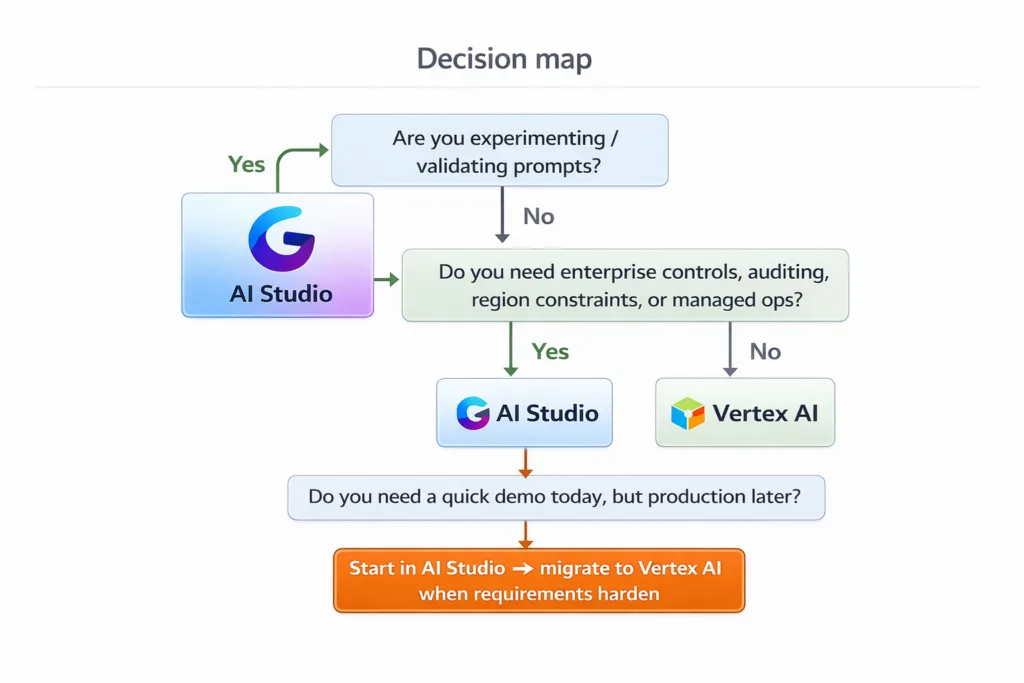
A practical migration mindset
Many successful teams treat AI Studio as the “prompt laboratory,” then move the validated artifacts into production:
- Prompt templates and system instructions
- JSON schemas for structured outputs
- Evaluation sets (golden test inputs + expected structured outputs)
- Fallback model strategy
This reduces rework because you’re not starting over—you’re promoting a proven prototype into a governed environment.
Future Outlook: Where AI Studio prototyping is heading
Looking through a 2026 lens, a few trends shape how AI Studio is likely to be used:
- More “app-like” prototyping: expect richer testing tools (scenario suites, regression checks, diff views) that feel closer to software QA than casual prompting.
- Structured outputs as default: as more applications depend on reliable automation, JSON Schema-style constraints will become standard practice, not an advanced technique.
- Agentic patterns become normalized: prototypes increasingly include tool calls, memory strategies, and multi-step workflows—requiring better debugging views for intermediate steps.
- Model lifecycle awareness: developers will treat model versions like other dependencies, with explicit versioning, changelogs, and migration playbooks.
Conclusion: Summary and key takeaways
Google AI Studio in 2026 is best understood as the fastest, most practical front door to the Gemini Developer API: a place to experiment with prompts, multimodal inputs, and—most importantly for real applications—structured outputs that turn model responses into reliable JSON.
- AI Studio is ideal for prototyping: quick prompt iteration, model comparisons, and API key generation.
- Structured outputs (JSON Schema) are a production-grade habit: they reduce parsing failures and make automation safer.
- Vertex AI is the production and governance platform: choose it when you need enterprise controls, compliance, and operational maturity.
- Plan for change: preview models and fast-moving releases make regression testing, versioning, and fallback strategies essential.
If you treat AI Studio as your “prompt lab” and carry forward tested prompts, schemas, and evaluation sets, you can move from idea to dependable product faster—while staying resilient to model updates and deprecations.