

Excerpt: LTX-2 is an open-source AI video generation model that lets you create videos entirely on your own GPU—no API keys, no cloud subscriptions, and no usage-based billing. This article explains what LTX-2 is, how local video generation works, what you need to run it, and how to build a reliable workflow from quick drafts to higher-quality renders.
Introduction: Why Local AI Video Generation Matters
AI video generation has moved fast—from early “moving images” to outputs that can resemble short cinematic shots. But most people experience this progress through cloud tools: you upload a prompt, pay per second (or per credit), and wait for a server to render your clip. That approach is convenient, but it can become expensive, unpredictable, and restrictive—especially when you’re iterating on ideas, generating many drafts, or working with sensitive content.
Local video generation flips the model. Instead of renting compute from a vendor, you run the model on your own machine and your own GPU. That means:
- No API keys (nothing to sign up for)
- No usage limits (generate as much as your hardware can handle)
- Better privacy (your prompts and media stay on your computer)
- More control (inspect, modify, and integrate the pipeline)
This is where LTX-2 stands out: an open-source AI video generation model designed for local use on consumer GPUs, offering text-to-video and image-to-video workflows—and in some configurations, synchronized audio—without recurring cloud costs. You “pay” with your own compute time and electricity, not per-second billing.
Definition: What Is LTX-2?
LTX-2 is an open-source AI video generation model that runs locally on your GPU, allowing you to generate videos from text prompts or input images without using cloud APIs. In practical terms, it’s a set of model weights plus an inference pipeline that you can run on your own hardware to produce short video clips at different quality levels.
If you’re new to local generative AI, an analogy helps:
- Using a cloud video generator is like ordering food delivery: fast to start, but you pay every time and you don’t control the kitchen.
- Running LTX-2 locally is like cooking at home: you buy the ingredients (a GPU), learn the recipe (setup), and then you can cook as often as you want.
How It Works: From Text or Images to Moving Video
At a high level, LTX-2 works like many modern generative video systems: it starts with “noise” (random visual data) and iteratively refines it into coherent frames that match your prompt or your reference image. The “magic” is a learned model that understands both appearance (what things look like) and motion (how things change from one frame to the next).
The Basic Pipeline (Conceptual)
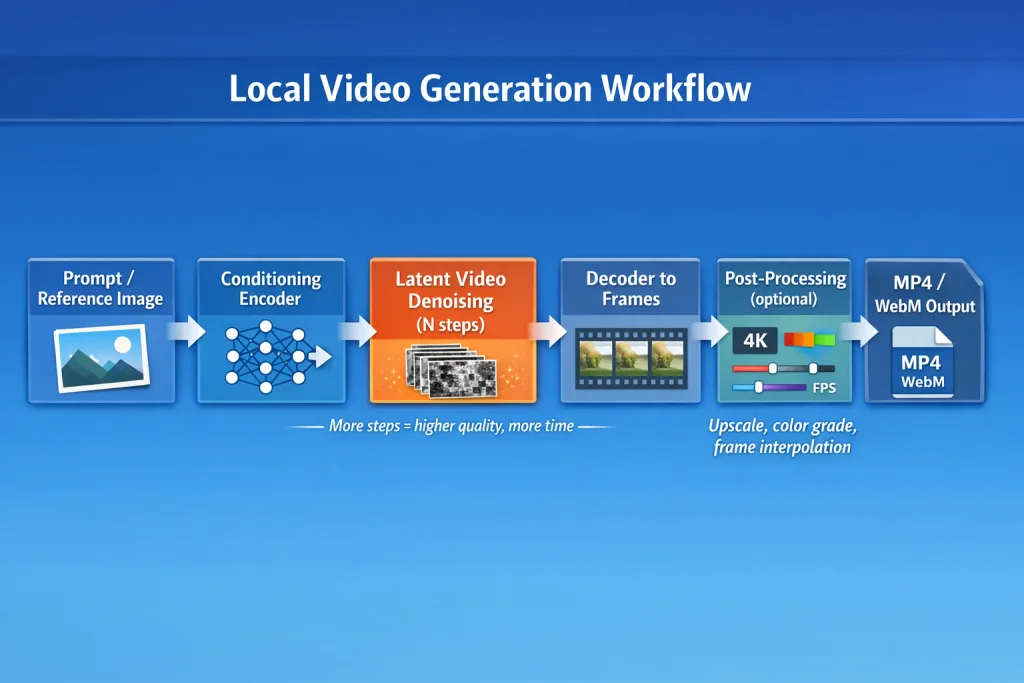
Here’s a simplified view of what happens during generation:
- Input conditioning: You provide text (and optionally an image). The model converts these inputs into internal representations that guide generation.
- Latent video generation: Instead of generating raw pixels immediately, the system often works in a compressed “latent space” that’s cheaper to compute.
- Iterative refinement (steps): The model runs multiple “denoising” steps, gradually turning noise into structured video content. More steps typically improve quality and coherence, but increase time.
- Decoding to frames: The latent representation is decoded into actual video frames.
- Optional post-processing: You may upscale, adjust color, stabilize motion, or add effects.
- Export: Frames are compiled into a video file at a chosen FPS and resolution.
Why “Steps” Matter (A Useful Analogy)
Think of steps like sketch iterations:
- Low-step generation is like a rough thumbnail sketch—fast and useful for exploring ideas.
- High-step generation is like a detailed illustration—slower but more polished.
LTX-2 includes variants (including distilled versions) that can produce usable results in fewer steps, which is valuable for rapid iteration on modest GPUs.
Key Components: What You Actually Need to Run LTX-2 Locally
Running a local model isn’t just about downloading weights. It’s a small ecosystem of pieces working together.
1) The Model Variants (Quality vs Speed vs VRAM)
LTX-2 is commonly available in multiple variants to fit different hardware and workflow needs:
- Full model: Best quality and fidelity, typically higher VRAM usage and longer render times.
- Distilled model: Optimized for fewer steps—faster drafts with slightly reduced quality or nuance.
- Quantized versions (e.g., FP8/FP4): Reduced precision to lower VRAM requirements and sometimes speed up inference, with potential trade-offs in fine detail or stability.
If you want to know more about Quanization, please read this neural-nexus.net (article)
Rule of thumb: Use distilled or quantized for ideation and tests; use higher-quality variants for “final” shots.
2) Your GPU (The Real Engine)
Video generation is GPU-intensive because it’s doing heavy matrix math across many frames. While high-end GPUs provide the best experience, LTX-2 is designed to be accessible across a range of consumer cards, especially if you use distilled or quantized variants.
Performance varies by resolution, FPS, clip length, number of steps, and VRAM. As an example of what top-tier hardware can do, a modern high-VRAM card can generate a short 720p, 24fps clip (a few seconds long) in under a minute depending on settings. Lower-end GPUs can still work, but you’ll typically reduce resolution, steps, or duration for practical iteration.
3) Interfaces: ComfyUI vs “Simple Web UI” Options
Most local AI video workflows fall into two interface styles:
- ComfyUI (node-based): You build a workflow like a visual circuit board. This is powerful for teams and repeatable pipelines (draft → refine → upscale → export), but it has a learning curve.
- Simplified web interfaces: These tools focus on “fill out a form and generate,” which is easier for beginners and quick experiments.
If you like modularity and reproducibility, ComfyUI is often the long-term winner. If you want speed-to-first-video, a simpler UI can be the fastest start.
4) The Supporting Stack (Drivers, Python, and Storage)
- GPU drivers: Correct GPU drivers are essential for CUDA acceleration.
- Python environment: Many pipelines run through Python packages and dependencies.
- Disk space: Model weights and caches can be large. Plan for tens of GB depending on variants and outputs.
Real-World Applications: What People Use LTX-2 For
Local AI video generation isn’t only about novelty clips. It can support serious creative and production workflows—especially when you value iteration and control.
1) Storyboarding and Pre-Visualization
Film and game teams can generate “concept motion” to test camera angles, pacing, mood, and lighting before spending time in 3D tools or live shoots.
Concrete example: A director generates five versions of a “slow dolly-in on a neon-lit alley” shot, picks the best composition, then uses it as a reference for a real camera plan.
2) Marketing and Social Video Drafts
Brands often need quick variations: different backgrounds, styles, or hooks. Local generation makes it cheap to explore many options.
Concrete example prompt: “A product hero shot on a rotating pedestal, soft studio lighting, shallow depth of field, clean white backdrop, subtle camera orbit.”
3) Music Visuals and Loopable Backgrounds
Short, stylized clips are useful for music visualizers, livestream backdrops, and ambient loops.
Tip: Generate short segments and then experiment with looping and crossfades in an editor to create longer visuals.
4) Internal Training and Sensitive Content
Some organizations can’t upload data to third-party services. Local generation helps keep assets, prompts, and reference images private.
Concrete example: A training department generates safety scenario visuals without sending internal facility images to an external API.
Diagram Description: Draft-to-Final Workflow
Diagram (described): A two-lane pipeline. Lane 1 (“Draft”) shows: low resolution → low steps → many variations → pick top 3. Lane 2 (“Finalize”) shows: higher resolution → more steps → optional upscale → color grade → export. A note between lanes reads: “Same prompt + seed for reproducibility”.
Benefits: Why LTX-2 Is Valuable
1) No API Keys, No Credits, No Surprise Bills
The biggest practical difference is cost structure. Instead of paying per second of video or per render, you pay once for hardware and then generate freely within your compute limits.
2) Privacy and Ownership
Your prompts, reference images, and outputs never need to leave your device. For creators, this can mean protecting unreleased concepts. For businesses, it can mean simpler compliance and fewer data exposure risks.
3) Full Control and Customization
Because you run the pipeline locally, you can:
- Inspect how prompts and settings affect results
- Swap components in a workflow (e.g., different upscalers)
- Standardize repeatable generation recipes for a team
4) Faster Iteration (In the Ways That Matter)
Cloud tools can be fast per render, but iteration cost adds up—financially and logistically. Local generation encourages experimentation: make 30 drafts, keep 2, refine 1.
Challenges and Limitations: What to Expect (and What Not to Assume)
Local video generation is empowering, but it’s not magic. Understanding the trade-offs prevents frustration.
1) Hardware Limits Are Real (Especially VRAM)
Video generation scales in cost with:
- Resolution (more pixels per frame)
- Clip length (more frames)
- FPS (more frames per second)
- Steps (more refinement cycles)
If you push all four high at once, VRAM usage and runtime can spike quickly. This is why many creators use a draft-first workflow and only upscale or re-render the winners.
2) “Cinematic 4K” Is a Target, Not a Guarantee
Some configurations and pipelines aim for very high resolutions and frame rates, but the practical outcome depends on your GPU, model variant, and workflow. Many users find that generating at a moderate resolution (e.g., 480p–1080p), then upscaling, is more efficient than attempting ultra-high resolution from the start.
3) Motion Coherence and Temporal Consistency
A common misconception is that AI video models always maintain perfect consistency across frames. In practice, you may see:
- Small identity drift (faces subtly changing)
- Background “wobble”
- Object shape instability during fast motion
This is improving across the field, but it’s still a reason to keep shots short, control prompts, and iterate.
4) Setup Complexity
Even “easy” local setups require some comfort with installs, dependencies, and GPU drivers. Expect an initial setup time (often in the range of minutes to an hour depending on your system and tools), followed by a smoother day-to-day experience.
5) Ethical and Legal Considerations
Local tools reduce platform restrictions, which increases your responsibility. Avoid generating misleading or harmful content, respect likeness rights, and ensure your use of reference images aligns with your legal and ethical obligations.
Future Outlook: Where Local AI Video Is Heading
LTX-2 is part of a broader trend: generative video is becoming more accessible on consumer hardware through smarter architectures, distillation, and quantization.
Expect near-term progress in these areas:
- Better efficiency: More quality per VRAM and per second through improved kernels and model compression.
- More controllability: Stronger tools for camera motion, character consistency, and scene constraints (similar to how ControlNet improved image workflows).
- Hybrid pipelines: Combining local generation with optional “burst” cloud rendering for studios that want flexibility without lock-in.
- End-to-end creative suites: More integrated UIs that handle drafting, selection, upscaling, editing, and export in one place.
The likely long-term outcome is that local video generation becomes a standard part of creative toolkits—similar to how local image generation quickly became a staple for design iteration.
Visite (github) for installation guide and start creating videos, locally
Conclusion: Key Takeaways
LTX-2 represents a practical shift: high-quality AI video generation isn’t limited to paid APIs and cloud platforms. With the right GPU and a sensible workflow, you can generate videos locally—free from API keys, subscriptions, and per-second billing.
- LTX-2 enables local text-to-video and image-to-video generation, giving creators control and privacy.
- Model variants (full, distilled, quantized) let you trade quality for speed and lower VRAM usage.
- The best workflow is iterative: generate many low-cost drafts, then re-render the best at higher settings.
- Hardware and time are the main costs, so plan around resolution, FPS, duration, and step count.
- Local doesn’t mean effortless: expect some setup and learn a few best practices for consistency.
If you’ve been held back by credit systems or vendor lock-in, LTX-2 is a compelling way to bring AI video generation home—powered by your own GPU and your own creative process.